
Delta Executor Features and Compatibility Guide
A complete reference for Delta Executor — features, Android compatibility, PC considerations, iOS information, the key system, performance expectations, update cadence, and common limitations.
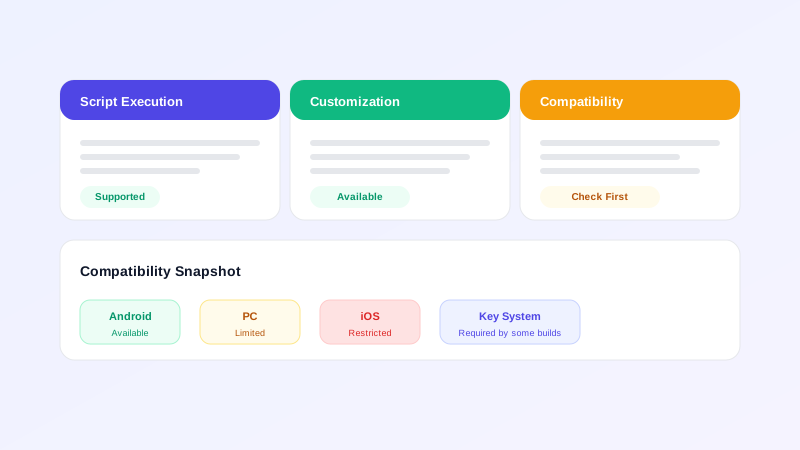
This article is the reference you come back to. It consolidates everything we know about Delta Executor — features, compatibility across platforms, the key system, performance, update cadence, and the limitations that come with any third-party tool. Bookmark it. When in doubt about whether your device supports something, start here.
Features at a glance
The features most commonly associated with Delta Executor across community discussion:
- Script execution. The core feature: load and run Lua scripts in Roblox game sessions.
- Script hub. A curated, browseable list of community scripts.
- In-app editor. Edit scripts on your phone before running them.
- Script library. Save and manage scripts for repeated use.
- Mobile-friendly UI. Layouts designed for touch screens.
- Settings and customisation. Themes, behaviour preferences, and layout options.
- Key-based verification (some builds). Optional gate on certain features.
- Update support. Regular builds to keep up with Roblox client changes.
Treat these as reported capabilities rather than guaranteed ones. Specific features vary between builds and versions. The publisher's release notes are the most reliable reference.
Android compatibility
Delta Executor's primary platform is Android. Compatibility considerations:
Android version
Modern Android versions are most likely to be supported. There's no single minimum version we can quote here because Android splits across many OEM skins and versions. Check the publisher's release notes for the specific build you're installing, and keep your phone reasonably current.
Architecture
Most modern Android phones are ARM64, which is what recent Delta Executor builds target. If you have an unusual device, double-check the build's notes.
Storage and RAM
A few hundred megabytes of free storage is enough. More important is free RAM — Delta Executor runs alongside Roblox, which is not a light application. Phones with limited RAM may struggle, especially with heavier scripts.
OEM-specific behaviour
Different Android skins behave differently. MIUI, OneUI, ColorOS, and others have additional permission layers and aggressive battery savers that can interfere with executors. If you have an unusual OEM skin, plan to spend extra time configuring permissions.
PC compatibility
Delta Executor is an Android APK. There is no verified native Windows executable. The realistic PC path runs the APK inside an Android emulator.
Emulator requirements
A PC capable of running an Android emulator needs hardware virtualization, 8 GB of RAM minimum, and at least 10 GB of free storage. Performance scales with the emulator and the host PC's resources.
Recommended emulators
BlueStacks, LDPlayer, MSI App Player, and Google Play Games beta are popular choices. Pick one that matches your priorities (ease of use, performance, official Google support) and download from the emulator's official site.
The full PC guide is on the PC page.
iOS compatibility
There is no verified iOS version of Delta Executor. iOS uses a different file format, a different distribution system, and stricter security controls. There is no path to install Delta Executor as a working iOS app.
Realistic alternatives for iOS users:
- Use a separate Android device.
- Run an Android emulator on a Mac (especially Apple Silicon).
- Wait for official Roblox features that may never come.
The full iOS discussion is on the iOS page.
Key system
Some Delta Executor builds include a key-based verification step. The key is a short code you paste into the executor to unlock features. Keys typically have a limited lifetime (hours to days) and are not your Roblox password or any other credential.
Legitimate keys are free and require no personal information. If a "key page" asks for passwords, payment, or installs, it's not legitimate.
The full key guide is on the Key page.
Performance expectations
Delta Executor is designed to run on mid-range Android phones. Realistic expectations:
- Cold start. A few seconds from tap to ready.
- Light scripts. Negligible impact on phone performance.
- Heavy scripts. Noticeable CPU and RAM usage; can cause frame drops in Roblox.
- Long sessions. Memory can accumulate; restart the app periodically if you notice slowdown.
- Battery. Like any running app, Delta Executor draws battery. Don't expect all-day battery if you're running it for hours.
Update cadence
Delta Executor is updated periodically to keep up with changes to Roblox's client. The typical pattern:
- Roblox updates its client. This can break executors temporarily.
- Community identifies the breakage. Bug reports surface within hours to days.
- Publisher releases a new build. Usually within a day or two for fast-moving issues.
- Users update. Manual install of the new APK.
There's no automatic update channel — APKs distributed outside the Play Store don't update themselves. You'll need to check for new builds periodically. The publisher's official channel is the place to look.
Common limitations
Honest list of limitations:
- Build drift. Features in build A may behave differently in build B.
- Script compatibility. Scripts written for other executors don't always run in Delta Executor.
- Detection risk. Roblox actively detects executors and may issue account consequences.
- No official support. No customer service line. Community help is the main resource.
- iOS gap. No iOS version.
- No automatic updates. Manual install each time.
When to use Delta Executor
Delta Executor is a reasonable choice if:
- You want to experiment with scripts on an Android device.
- You prefer a mobile-first interface.
- You're comfortable with the third-party risk profile.
- You have a separate Roblox account you're willing to use.
It's not a good choice if:
- You only have an iOS device and no Android access.
- You can't afford to lose your main Roblox account.
- You need a tool with formal support or SLAs.
- You want to use it for anything beyond personal experimentation.
Final note
Delta Executor is a real, working tool with a clear user base. It carries the standard third-party risks, which are manageable with the habits covered in the Safety article. If you've read this far, you have a more complete picture of what you're getting than most users do.
The rest of the site is structured to support that picture. The Android page covers the install. The Features page covers the in-app experience. The Key page covers key-based builds. The Fixes page covers what to do when something goes wrong.
Reference summary
A condensed table to keep handy when you need to check something quickly:
- Platform primary: Android (APK)
- Platform secondary: PC (via Android emulator)
- Platform not supported: iOS (no working version exists)
- Requires root: No
- Updates: Manual, periodic, from publisher
- Key system: Optional, build-dependent
- Cost: Free (no premium tier for legitimate builds)
- Account risk: Possible Roblox ToS consequences
- Best alternative if you can't use it: A separate Android device
Keep this list in mind whenever you see a claim about Delta Executor that contradicts it. "Works on iOS," "100% undetectable," "guaranteed no ban," "official Roblox product" — none of these match the reference picture above. If you encounter them, treat the source with skepticism.